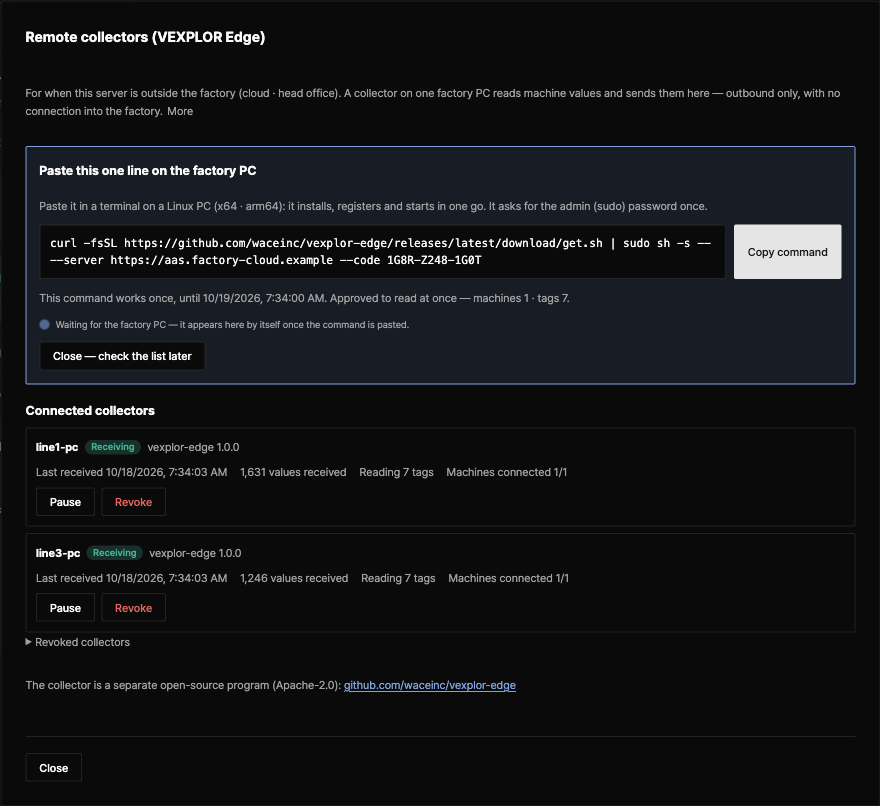
The remote collector for when the server sits outside the factory — in the cloud or at head office. Press one button on the VEXPLOR AAS Studio screen, paste the line it shows on the factory PC, and install, registration and approval are done.

Remote collectors screen — the one-line command and two connected collectors (test connection to a virtual PLC). Real screen, AAS Studio 2.7.0 · Edge 1.0.0
In Settings → Remote collectors, check the server address and the list it will read (machines, tags). With "Approve this list so it reads at once" ticked, that press is the approval too.
Paste it in a terminal on the factory Linux PC: it downloads the package for the PC's CPU, checks it against SHA256SUMS, then installs, registers and starts the service.
The moment the PC connects, the screen shows its name and "Receiving". Values come into "Collect" for that machine file every 10 s.
curl -fsSL https://github.com/waceinc/vexplor-edge/releases/latest/download/get.sh | sudo sh -s -- --server https://aas.example.com --code 7KQ4-M2XD-9PRT
The screen makes the command with the server address and a one-time code (24 h) filled in. The address and code above are examples.
| Where the server is | What reads the machines |
|---|---|
| On the machines' network — a server in the factory | The collector inside the VEXPLOR AAS Studio server. VEXPLOR Edge is not needed |
| Outside the factory — cloud, head office | VEXPLOR Edge — one factory PC reads and sends out only |
Any server that follows the contract vexplor.edge/1 receives it. VEXPLOR AAS Studio does today; VEXPLOR Logic Studio Cloud receives the same contract too (opened to design-partner companies first, in order).
| Item | Detail |
|---|---|
| Read only | No code writes to a PLC or controller. It reads with the same code as the AAS Studio server's collector (OPC UA, Modbus TCP, MQTT) |
| Outbound only | It goes out to the server on 443 (or the site proxy) only. It opens no port, so there is no way in |
| Approved list only | It reads only the tags a person approved on the server. A changed list waits for a new approval |
| Every request signed | On registering it makes an Ed25519 key on the PC and signs every request. The private key never leaves the PC |
| Nothing lost on an outage | Batches wait on disk and go out in order when the server answers again (30 days by default); each is stored once |
| Send changes only (optional) | OPC UA subscriptions with a deadband. 6 tags, 1 s, 5 minutes measured: 283 KB → 88 KB |
| No remote stop | The server sends no commands. A revoked collector stops sending by itself and keeps its queue |
| No auto-install | It can report a newer release; a person downloads and installs it |
| Destination | Why | When |
|---|---|---|
| The server on 443 (or the proxy) | Read list, value batches, registration | Always |
| Machine addresses in the approved list | Reading values (OPC UA, Modbus TCP, MQTT) | After approval |
| Release notice address | Checks for a new version once a day — installs nothing | Only if configured |
curl -fsSL https://github.com/waceinc/vexplor-edge/releases/latest/download/get.sh | sudo sh -s -- --server https://aas.example.com --code 7KQ4-M2XD-9PRT
From Releases take vexplor-edge-1.0.0-linux-x64.tar.gz (or linux-arm64) and SHA256SUMS, bring them over, check them, then run sudo ./install.sh --server … --code ….
| Open source | Detail |
|---|---|
| Current version | VEXPLOR Edge 1.0.0 · contract vexplor.edge/1 · servers VEXPLOR AAS Studio 2.3.0 or later (one-click screen from 2.7.0) |
| Supported | Linux x64 · arm64 (systemd). Windows is in preparation |
| License | Apache License 2.0 — modify it and ship it in commercial products |
| Name · logo | The VEXPLOR and WACE names and logos are not covered by the Apache-2.0 license (see NOTICE) |
| Source · docs | github.com/waceinc/vexplor-edge |
VEXPLOR Edge is the open-source partner of VEXPLOR AAS Studio. AAS Studio makes the machine AASX and the collection link (AID) inside it; when the server is outside the factory, VEXPLOR Edge reads by that link inside the factory and sends the values out.
See VEXPLOR AAS Studio →Download it from the public repository and install it yourself. To review machine integration with us, request an adoption assessment.