VEXPLOR
VEXPLOR AAS STUDIO · OPEN SOURCE · APACHE-2.0 · v2.2.0

VEXPLOR AAS Studiohandles AASX authoring, validation, live collection and MES, ERP and CMMS integration in one web app

Upload a machine's AASX: 43 rules show what breaks, and the fixable findings are repaired in one step after a preview. The same server serves the AAS over the IDTA Part 2 REST API, collects machine values over OPC UA, Modbus TCP and MQTT, and sends events and equipment data to MES, ERP and CMMS.

Built for manufacturing IT/OT engineers, MES · ERP · CMMS integrators and teams preparing AAS submissions — self-hosted.

Demo account demo / 0629 — opens in a new tab. The trial server is for demonstration.
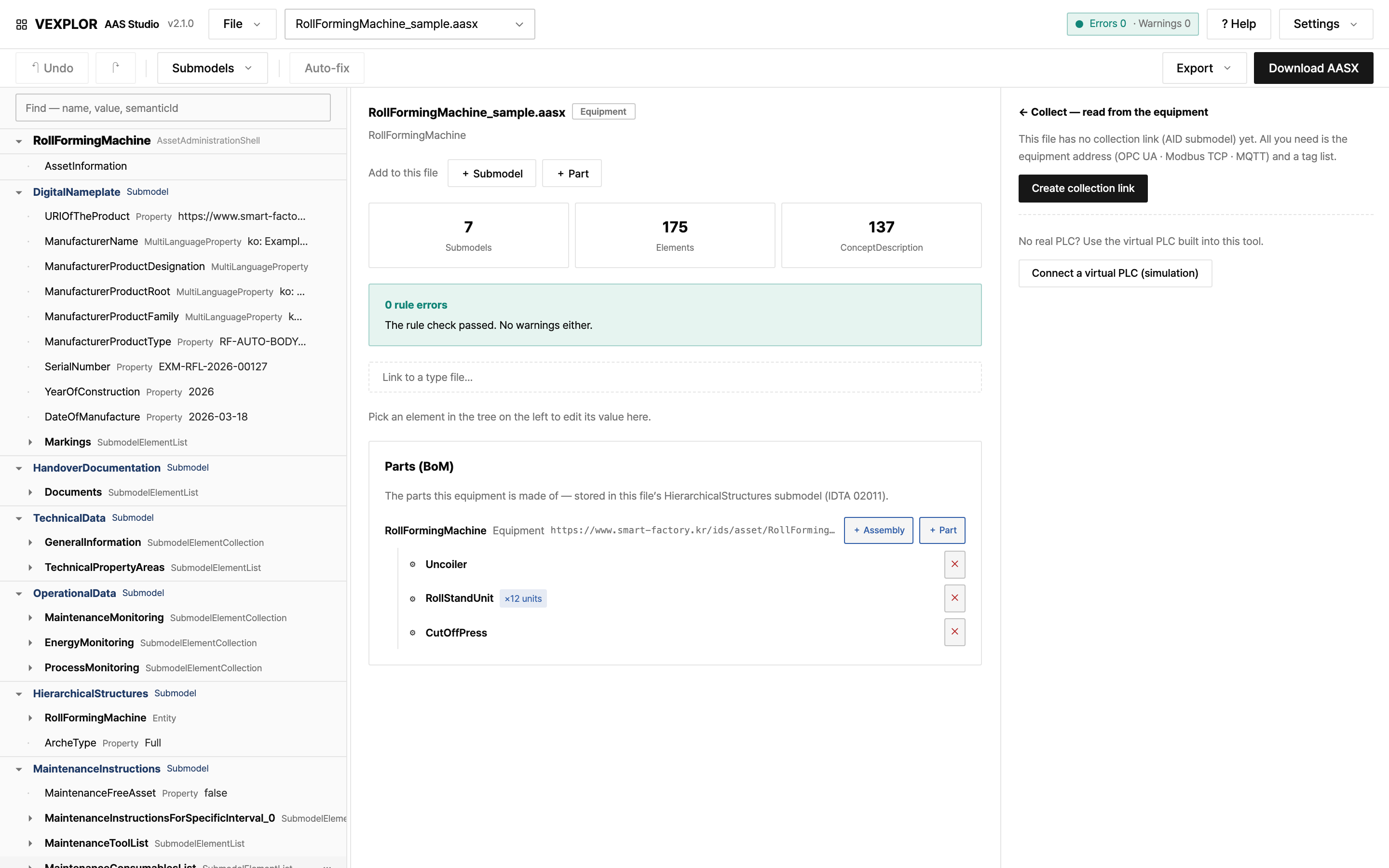
VEXPLOR AAS STUDIO · WORKSPACE
VEXPLOR AAS Studio workspace — AAS tree on the left, summary in the middle, collection panel on the right, with the sample file (a roll-forming machine) open

Workspace — tree on the left · summary in the middle (7 submodels · 175 elements · 0 rule errors) · collection panel on the right. Sample file · v2.1.0 screen

43lint rules
19auto-fix rules
V3.0AAS metamodel
3collection protocols: OPC UA · Modbus TCP · MQTT
01WHYTHREE TOOLS · ONE SCREEN

VEXPLOR AAS Studio brings the work of three tools
into one browser screen

TaskUsual toolHere
Open · edit · export AASXAASX Package Explorer (desktop)In the browser, with findings and auto-fix
Serve AAS to other systems (Part 2 REST · registry)Eclipse BaSyx serverThe same server does it
Collect machine values · publish by subscriptionSeparate OPC UA client / serverCollects per the AID in the AAS and publishes via an OPC UA server

Not affiliated with, and not derived from, the tools above — it combines the same jobs in one place.

The receiving validator remains the only authority on acceptance.An AASX can pass every standard check and still fail the receiving validator's business rules (semantic-ID allow-lists, mandatory submodels, package structure). VEXPLOR AAS Studio checks those rules before you submit.
02FEATURESSIX FEATURES · REAL SCREENS

Six things VEXPLOR AAS Studio does
— every picture is a real screen

01Author & tree

The tree shows the whole AASX, and you edit values in place

  • Open AASX (JSON or XML) and browse AAS → submodel → element
  • Edit values, elements, submodels and concept descriptions; fill many values at once from a value table or a CSV equipment list
  • One-step undo, and restore a submodel to an earlier point
  • No file yet? "Start with a sample" opens a fully filled machine and a process structure
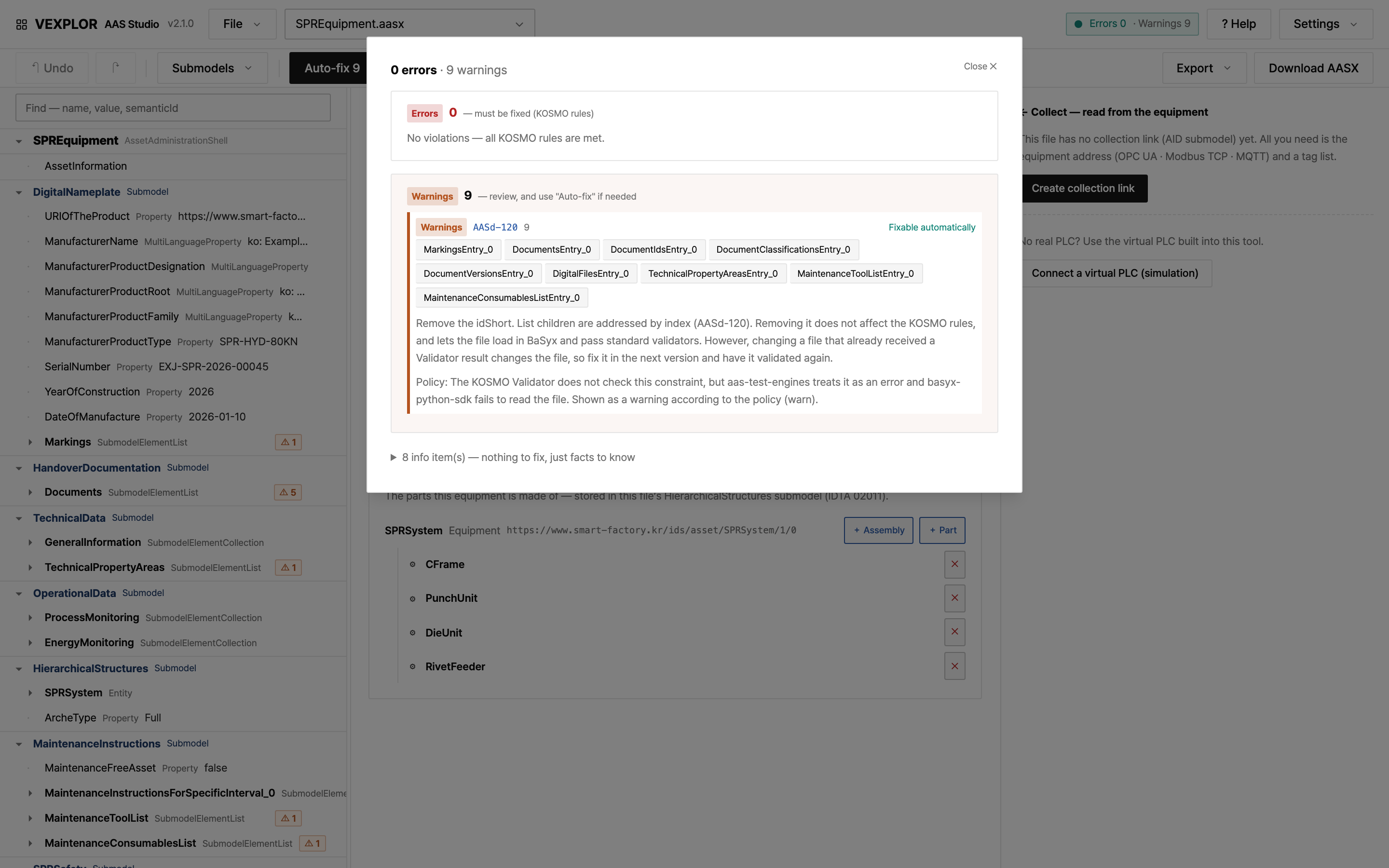
VEXPLOR AAS STUDIO · FINDINGS
Findings screen — 0 errors · 9 warnings (fixable automatically)

Findings — 0 errors · 9 warnings (fixable automatically). Sample file SPREquipment · v2.1.0 screen

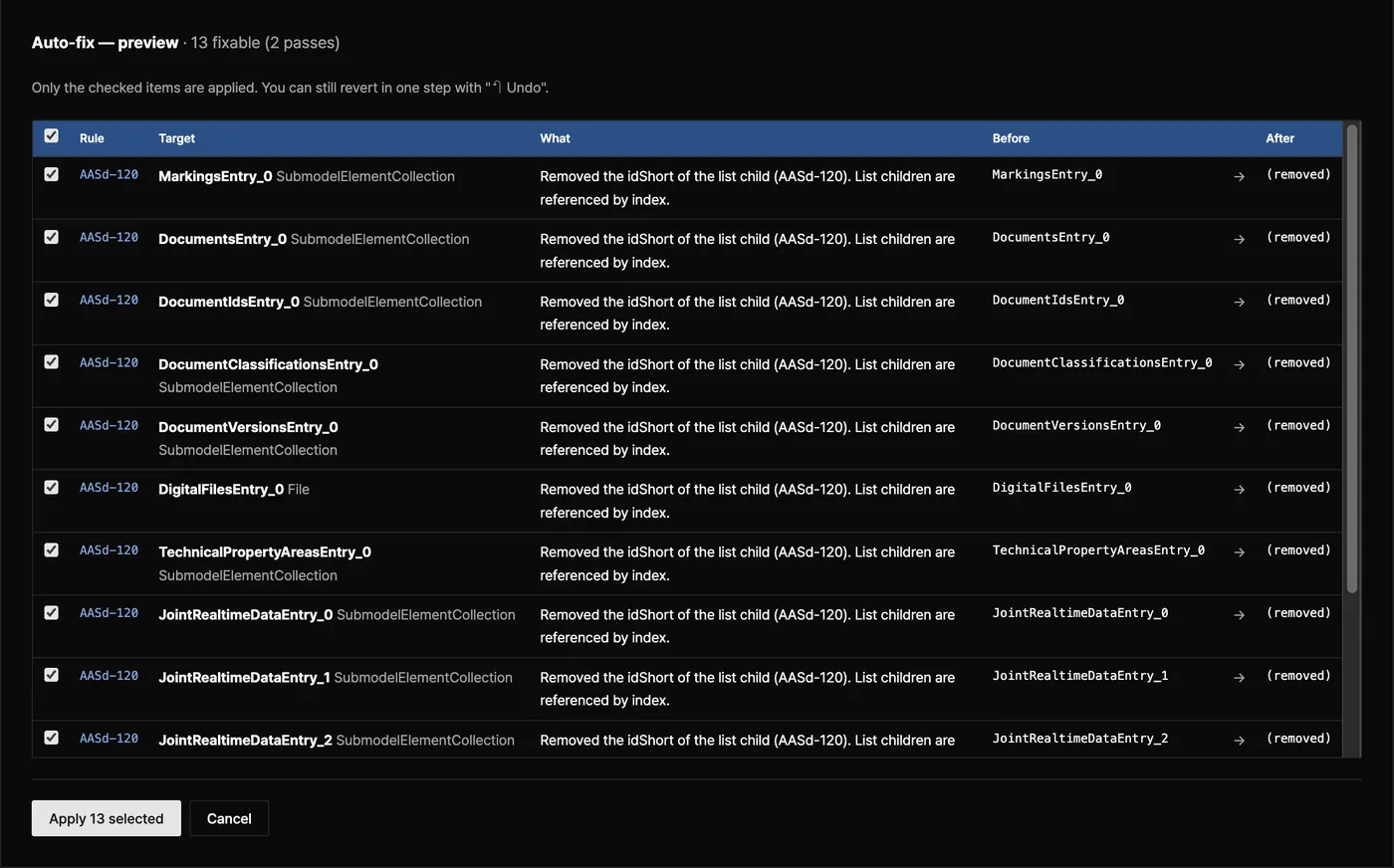
VEXPLOR AAS STUDIO · AUTO-FIX
Auto-fix preview — a checkbox per item with the value before and after

Auto-fix preview — a checkbox per item with the value before and after

02Findings & auto-fix

43 rules point to what breaks and show each change before it applies

  • Three layers: package structure (L1), metamodel constraints (L2), submission business rules (L3)
  • Errors, warnings and notes, each with the reason and how to fix it
  • Fixable findings (19 rules) show before / after; only the checked ones apply, and every relocation is recorded
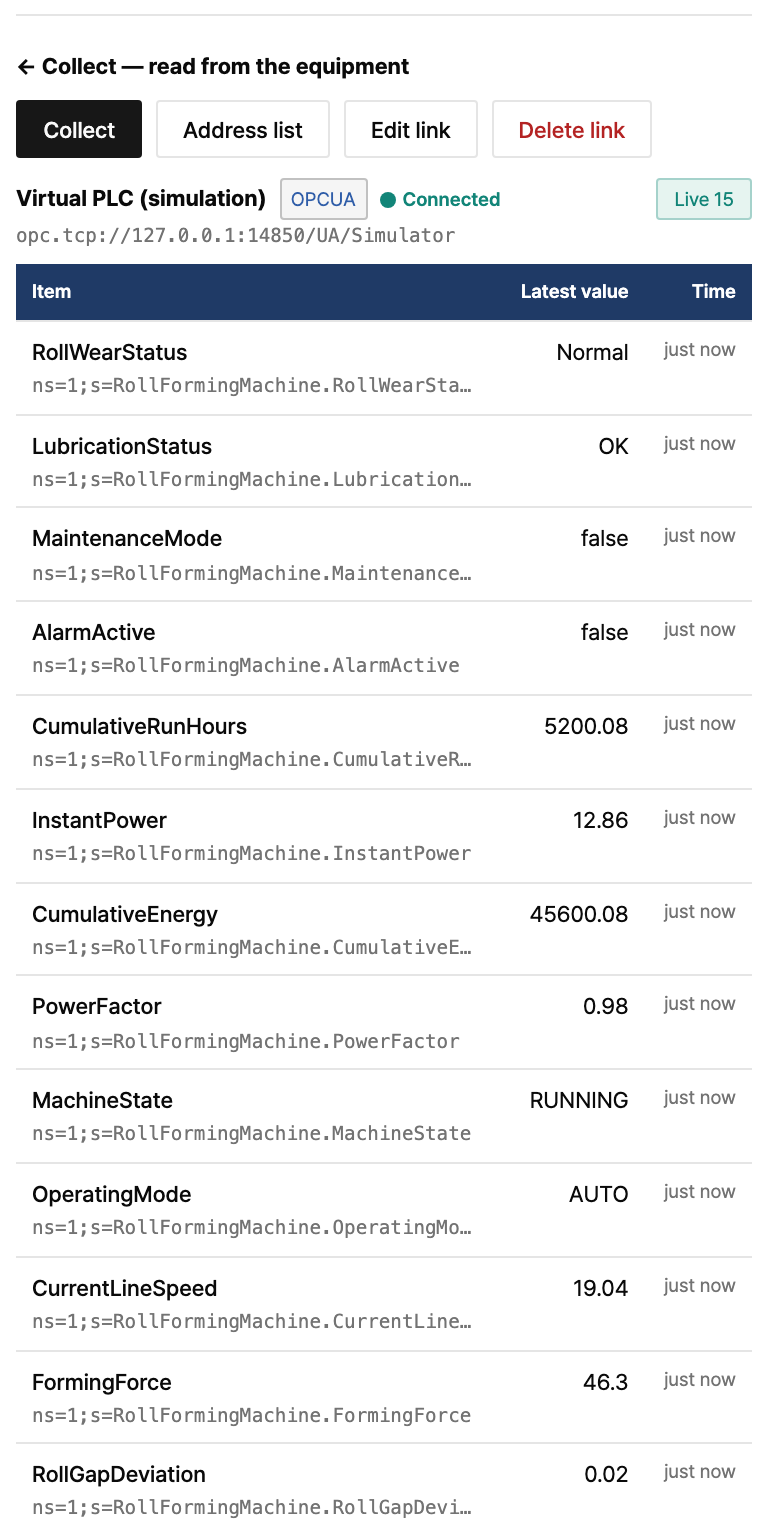
AAS STUDIO · COLLECTION
Collection panel — the sample file connected to a virtual PLC (simulation)

Collection panel — the sample file connected to a virtual PLC (simulation). Demo values, not a real machine.

03Live collection

The server collects machine values by the AID inside the AAS and draws each machine's day

  • OPC UA, Modbus TCP and MQTT, addressed by the AID submodel (IDTA 02017) inside the AAS
  • Each value shows whether it is live, stale or missing
  • Each machine gets a daily status bar (running · stopped · alarm)
  • No PLC at hand? Test with the virtual PLC built into the tool

04Standard API

Other systems read the AAS held here through the IDTA Part 2 REST API

  • AasxFileServer 6/6 · ConceptDescription 7/7 · AAS Repository 47/54 · Submodel Repository 38/45, partial Registry and Discovery
  • Look up a shell by globalAssetId, then read submodels at the endpoint in its registry descriptor
  • node scripts/part2-coverage.mjs compares the implementation with the specification's OpenAPI files
# find the shell (globalAssetId)
GET /api/v3.0/lookup/shells?assetIds=<base64url>
# Part 2 base path per file
GET /packages/{packageId}/api/v3.0/shells
GET /packages/{packageId}/api/v3.0/submodels/{id}
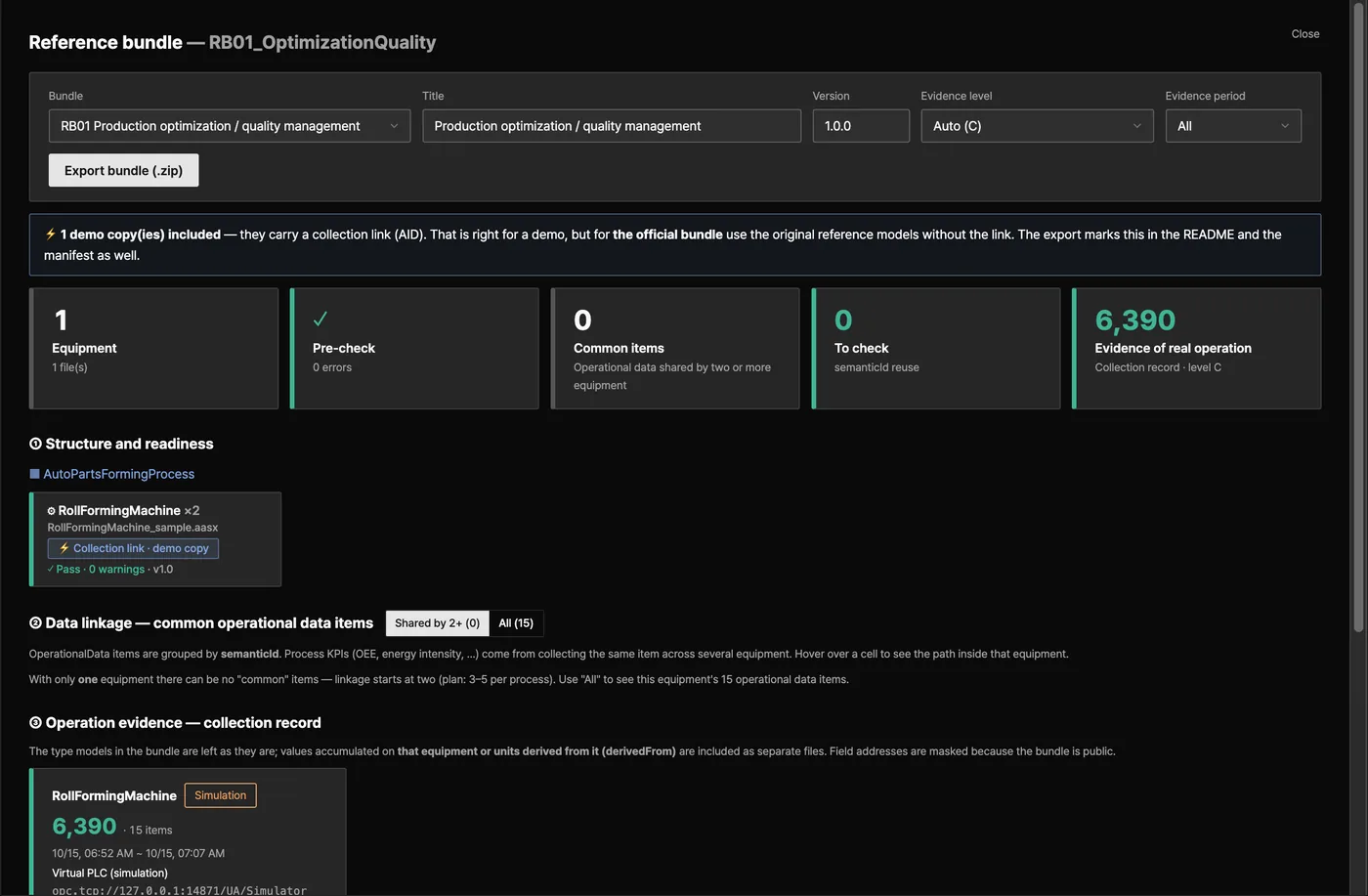
VEXPLOR AAS STUDIO · REFERENCE BUNDLE
Reference bundle — equipment count, pre-check, operation evidence and structure

Reference bundle — equipment count, pre-check, operation evidence and structure. Demo file on a virtual PLC (simulation)

05Bundle & report

A process grouping exports as a submission bundle and a validation report

  • Group machines as company → line → process → equipment → part
  • One reference-bundle ZIP with models, attachments and pre-check results; bundle-manifest.json records a SHA256 per file
  • The validation report is HTML and prints straight to PDF
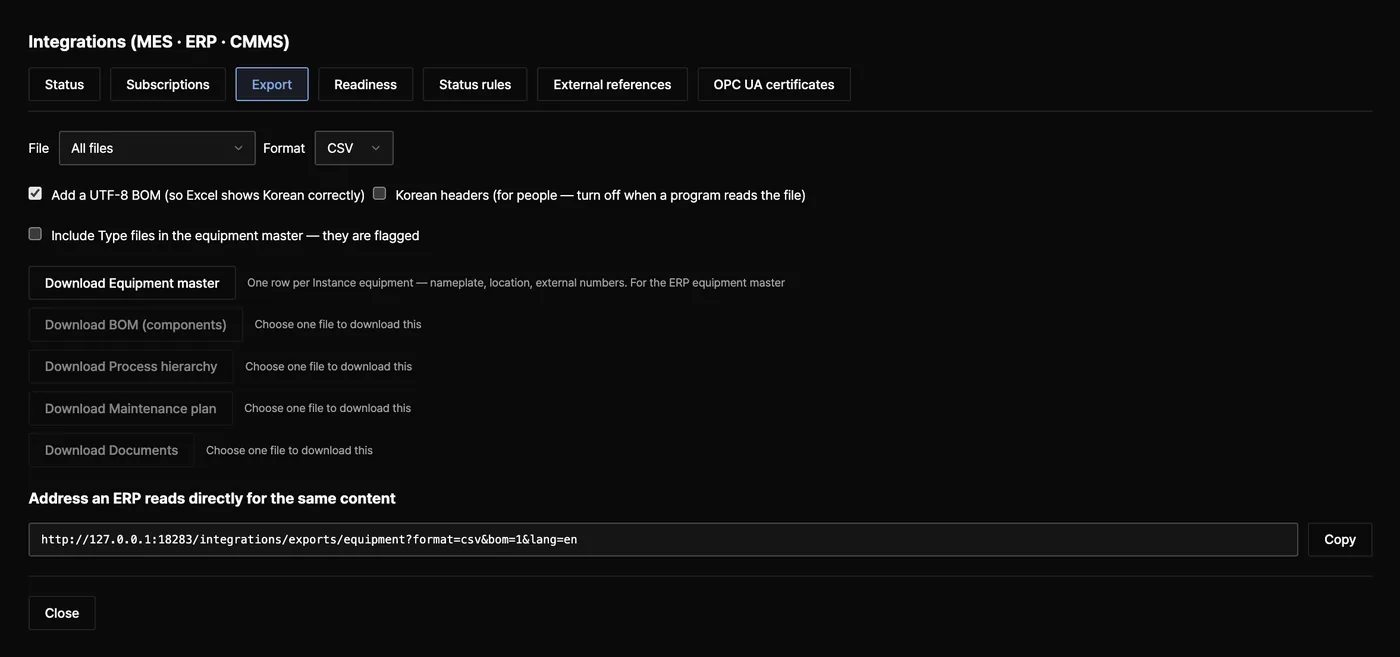
VEXPLOR AAS STUDIO · INTEGRATIONS
Integrations window — Export tab: equipment master, BOM, hierarchy, maintenance plan, documents

Integrations window — Export tab: equipment master, BOM, hierarchy, maintenance plan, documents

06MES · ERP · CMMS integration · new in 2.0

New in 2.0: MES, ERP and CMMS receive equipment events and master data

  • Pull feed — every model change and runtime event as CloudEvents 1.0, totally ordered, resumable from any cursor
  • Signed webhooks — HMAC-SHA256 signatures, retries, and dead letters kept for replay
  • MQTT — the same events on topics, with each machine's current state retained
  • Runtime rules — state, alarm, counter and threshold events from collected values
  • Exports — equipment master, BOM, hierarchy, maintenance plan and documents as JSON or CSV; since 2.1.0 also as one ZIP, and since 2.2.0 the same bundle can be built from AASX files without a server (the @aas/bundle library)
  • External references — ERP, MES and CMMS numbers are kept next to the AASX, not inside it

Integrations are off by default — turn them on with INTEGRATIONS=on. Creating subscriptions on PostgreSQL also needs AAS_SECRET_KEY. They are always off on the trial server.

Integration guide (MES · ERP · CMMS) →
03CONNECTIONSSTANDARD PROTOCOLS

VEXPLOR AAS Studio connects machines and plant systems
with standard protocols

Machines · PLCs

  • OPC UA
  • Modbus TCP
  • MQTT

Addressed by the AID in the AAS

VEXPLOR AAS Studio

  • AASX storage · editing
  • 43-rule check
  • Collected time series
  • Event log

MES

  • CloudEvents pull feed
  • Webhook · MQTT
  • OPC UA subscription (read-only)
  • Hierarchy CSV · JSON

ERP

  • Equipment master · BOM export
  • equipment.master.changed events

CMMS

  • Alarm webhooks
  • Maintenance plan · documents
  • Meters

Other AAS tools

  • AAS Part 2 REST
  • Registry · Discovery
Publish only.VEXPLOR AAS Studio never writes into MES, ERP or CMMS and never commands machines. Its OPC UA server is read-only.
04SECURITY · DEPLOYMENTSELF-HOSTED

You host the server
and decide accounts and roles

ItemDetail
Self-hostedDocker Compose, or from source on Node.js 22 or later. No external cloud is involved.
StoragePostgreSQL for shared use, or a single data folder for one person.
Accounts & rolesAdmin, editor, viewer — with an audit trail of who changed what.
Who can reach itRun from source with neither accounts nor an API key and it listens on 127.0.0.1 only. The Docker example opens it to your network (AAS_ALLOW_OPEN=1 in .env.example), so create the first administrator right after start and put HTTPS in front.
OPC UA serverOff by default. When on, clients sign in with a web account over Sign or SignAndEncrypt; no anonymous sessions, and an administrator trusts each client certificate once.
Private workspacesAAS_WORKSPACE=private shows each person only what they uploaded.
Sign-in protectionOnly scrypt hashes are stored; five failures lock the account for five minutes. Cookies are HttpOnly and SameSite=Strict.
Outbound connectionsWebhooks and MQTT refuse loopback and metadata addresses; private networks only when listed. Signing secrets are sealed with AES-256-GCM.
05LIMITSWHAT IT DOES NOT DO

What VEXPLOR AAS Studio does not do,
and known limitations

  • The receiving validator decides acceptance. This tool is a pre-check.
  • It never writes into MES, ERP or CMMS, never commands machines and never computes an OEE number (it gives the time and counter inputs).
  • Shared by default: everyone who signs in sees the same files. Even in private mode, administrators and API keys see everything.
  • Sessions live in server memory: a restart signs everyone out, and one server instance is assumed.
  • No e-mail is sent. If someone forgets a password, an administrator resets it.
  • Integration subscriptions cover the whole server; narrow a subscription to its files when one customer's data must not reach another system.
  • The AAS metamodel is pinned to V3.0 and not auto-upgraded to 3.1. The Part 2 API covers the operations listed above.
Full security policy →
06GET STARTEDDOCKER · TRIAL SERVER

Four lines start VEXPLOR AAS Studio
with Docker

git clone https://github.com/waceinc/vexplor-aas.git && cd vexplor-aas
cp .env.example .env
sed -i.bak "s/^POSTGRES_PASSWORD=.*/POSTGRES_PASSWORD=$(openssl rand -hex 16)/" .env
docker compose up -d --build

Line three fills the empty database password (POSTGRES_PASSWORD) with a random value — Docker refuses to start while it is empty.

Open http://localhost:8080 and go to Settings → Create the first administrator. The server is open to your network (AAS_ALLOW_OPEN=1), so it asks for a setup code, printed in the startup log: docker compose logs app | grep "설치 코드" (or grep "setup code" with AAS_LANG=en in .env). Until the first administrator exists, anyone on the network can open it.

Trial server

Use the demo account without signing up. Downloading your files requires an account.

Demo accountMember
Open · edit · lint · auto-fixYesYes
View the validation reportYesYes
Download AASX · bundleMembersYes

Demo account demo / 0629. Each demo sign-in gets its own empty workspace, and idle files are deleted. The operator can see them — keep confidential data on your own server.

Open sourceDetail
Current releaseVEXPLOR AAS Studio 2.2.0
LicenseApache License 2.0 — modify it and ship it in commercial products
Names · logosThe names and logos VEXPLOR and WACE are not licensed under Apache-2.0 (see NOTICE)
Source · docsgithub.com/waceinc/vexplor-aas · Official project page
07PLACE IN VEXPLOR SUITEUNDER CONNECT

Place in VEXPLOR Suite

Under Connect sits the open-source tool VEXPLOR AAS Studio (Apache-2.0).

Connect is the equipment and system integration module. Using the international standard AAS (IEC 63278) and industrial protocols, it converts floor data into a standard format.

See VEXPLOR Connect →

From AASX authoring to MES, ERP and CMMS integration in one web app

Download it from the public repository and install it yourself. To review equipment integration with us, request an adoption diagnosis.

Get it on GitHubRequest a Diagnosis